10 Server Rack PDU Buying Tips for Global Buyers

Choosing a Server Rack Pdu is not just a matter of counting outlets. For global buyers, the right unit must match the rack, electrical supply, equipment load, and local installation requirements. A mismatch can mean unused sockets, awkward cable runs, or a PDU that cannot support planned expansion.

Check the rated current, voltage, phase, plug type, and outlet configuration against the site’s actual power specifications. Then consider whether basic, metered, or switched monitoring fits your operations. Useful details include cord length, mounting orientation, outlet spacing, temperature conditions, and access to replacement parts. Small details matter. A bulky adapter can block a neighboring outlet; a short input cord can complicate rack placement. Ask suppliers for current datasheets, clear product images, and written confirmation of key specifications. Independent verification is sensible, especially when equipment will be deployed across several countries.

Compare more than the purchase price. Freight, lead times, warranty coverage, technical support, and spare-part availability all affect the cost of ownership. Confirm that the proposed PDU works with your rack depth and connected devices, and have a qualified site professional review the electrical fit. Supplier claims are useful, but they are not a substitute for checking the installation details. I have seen buying checklists become overly focused on features; in practice, a reliable delivery date or responsive support contact may matter more. That is easy to overlook. The following tips help buyers ask sharper questions, compare options consistently, and choose a PDU suited to real operating conditions—not just a product page.
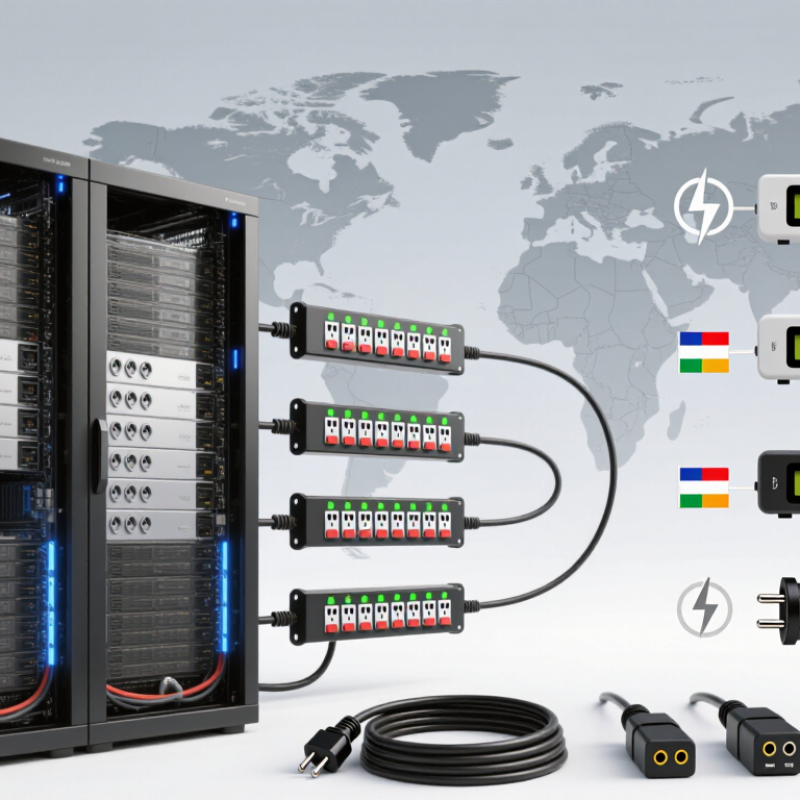
10 Server Rack PDU Buying Tips for Global Buyers

Understanding Server Rack PDU Types and Their Functions

Understanding Server Rack PDU Types and Their Functions

A server rack PDU distributes power from a facility circuit to equipment mounted in a rack. A basic model provides outlets without detailed measurement. Metered models show current or power locally, helping technicians spot an uneven load before adding another server. Monitored PDUs send readings over a network. Switched models can control individual outlets remotely, which is useful when equipment needs a power cycle. Some units combine these functions, so type names alone may not tell the whole story.

Match the PDU to the rack’s electrical supply and the equipment it will serve. Check input voltage, phase, plug type, outlet count, and each outlet’s rating. For example, a rack with two power supplies per server may need separate PDUs on separate circuits. Compare the expected load with the PDU’s rated capacity, and leave suitable operating headroom. A crowded outlet strip is not a load plan. It is easy to focus on outlet count and miss connector placement or cable reach.

Tips: List every device and its power requirements before ordering. Confirm that plugs fit without blocking neighboring outlets. For distributed sites, verify local voltage and facility connections with the site team; specifications can vary. Remote switching is helpful, but it cannot replace safe shutdown procedures. The right features depend on the rack, and a spreadsheet can still miss one awkward cable.

10 Server Rack PDU Buying Tips for Global Buyers: Types and Functions

How to read the chart: 1 means the function is typically part of that PDU type; 0 means it is not an inherent feature. Actual features vary by model. When choosing a PDU, check input voltage and phase, total load, outlet count and type, plug compatibility, mounting, cord length, metering needs, remote monitoring, outlet-level switching, and redundancy or transfer requirements.

Assessing Power Capacity, Voltage, and Outlet Needs

A PDU should match the rack’s real load, not just its nameplate total. List every server, switch, and storage unit, then check its rated input current and voltage. Allow for measured peak demand and planned growth, but do not count redundant A/B feeds as extra usable capacity. Keep a margin. A forecast can still miss.

Voltage and phase need site-level verification. Global buyers may encounter 208 V, 230 V, or 400 V supplies; these are not interchangeable assumptions. Confirm the facility feed, frequency, connector type, and whether the PDU supports single-phase or three-phase power. The IEA’s Energy and AI report (2025) estimates data centers used about 415 TWh in 2024, potentially rising to 945 TWh by 2030. That is not a rack forecast, but it underlines why local capacity checks matter.

Count outlets by device and plug type, not by total outlet number alone. A rack with ten servers may need different connectors from one with four servers and several high-power switches. Leave a few usable outlets for replacements or expansion. Check outlet-level current limits, phase balance, and branch-circuit ratings before ordering. Small details matter. Physical fit matters, too: a deep plug or thick cable can block the neighboring outlet, and that is easy to overlook on a spreadsheet.

Checking Regional Plug Standards and Safety Certifications

When evaluating a rack PDU for an overseas site, match its plugs and sockets to the actual facility, not just the country name. A data center may use local wall outlets, IEC C13 or C19 connections, or hardwired feeds. Confirm the input plug, outlet types, voltage, frequency, and rated current against the site’s electrical plans. Check the label. A mismatch can leave an expensive unit unusable.

Request safety test reports and certification records for the exact model and configuration. Requirements vary by market and product type, so a familiar conformity mark alone may not confirm local acceptance. Verify documents with the issuing body or an accredited testing laboratory, and check whether they cover the cord set, enclosure, and overload protection. Compare the PDU’s rating with the branch circuit and expected load, leaving suitable capacity for changes. Small details matter. It is easy to treat an adapter as a minor purchasing issue; in practice, it can complicate installation and site approval. Ask the facility electrician to confirm compatibility before shipment.

Comparing Monitoring, Metering, and Management Features

Monitoring, metering, and management describe different PDU capabilities. Monitoring shows live conditions, such as input current, temperature, and alarms. Metering records electrical use, but measurement points vary. Some units report total input; others measure individual outlets. That distinction matters. Check measurement accuracy, update intervals, and whether readings can be exported for analysis.

The U.S. Department of Energy’s 2024 data center energy report estimates that U.S. data centers used 176 terawatt-hours in 2023. It projects 325 to 580 terawatt-hours by 2028. This rising demand makes dependable load visibility useful, though a meter alone does not save energy. Buyers should compare per-outlet data, phase-level readings, and alerts for overloaded circuits. Useful, but incomplete.

Management adds remote actions, such as switching outlets or scheduling power cycles. Verify role-based access, event logs, API support, and compatibility with existing monitoring systems. For international deployments, confirm voltage, phase, outlet type, and network requirements across each site. A polished dashboard can still hide blind spots if readings arrive late or omit branch circuits. Test sample alerts and reports before ordering at scale; small display differences can complicate comparisons.

10 Server Rack PDU Buying Tips for Global Buyers - Comparing Monitoring, Metering, and Management Features

# Buying tip What to compare Practical checks Best fit
01 Choose the right PDU type Basic distribution, input metering, outlet monitoring, and switched outlet control provide different levels of visibility and control. Decide whether you need to measure load, identify individual outlet use, or remotely switch outlets. More functionality generally adds configuration and management requirements. Basic units suit stable loads; monitored or switched units suit environments that need remote visibility or control.
02 Check the electrical input Rated voltage, phase, frequency, current, connector type, and the facility’s supply configuration. Match the PDU input to the installed circuit and receptacle. Confirm local electrical requirements with a qualified facilities or electrical professional. All buyers, especially teams deploying equipment across regions or different facility types.
03 Verify outlet quantity and type Outlet count, outlet standards, outlet spacing, and whether the outlets match the connected equipment’s power cords. Count planned connections, allow for future additions, and check whether large power adapters or cable bends could block neighboring outlets. Racks with varied equipment, dense power supplies, or planned capacity growth.
04 Compare metering granularity Measurements at the PDU input, branch circuit, or individual outlet level. Input-level readings show overall PDU load; outlet-level readings help associate consumption with connected devices. Confirm which readings are available locally and through the management interface. Input metering for overall load visibility; outlet metering for detailed allocation and troubleshooting.
05 Review measurement specifications Available readings, stated accuracy, measurement range, and whether values are instantaneous or accumulated over time. Check the product documentation for the specific parameters and accuracy conditions. Do not assume that every PDU measures energy, power factor, voltage, current, and power at every measurement point. Buyers comparing energy data, capacity reports, or operational dashboards.
06 Assess monitoring and alerts Local display, web interface, threshold alerts, alarm history, and notification methods supported by the unit. Check whether thresholds can be set for the measurements you use and whether alerts are available through your required channels. Confirm how alarm status is retained after an event. Operations teams that need to identify rising loads or respond to power conditions before they disrupt service.
07 Check management protocols Supported network protocols and integration options, such as SNMP, HTTPS, or APIs where specified. Verify protocol versions, authentication options, data points, and compatibility with your monitoring platform. Confirm that required features are included in the selected model. Organizations integrating rack power data into centralized monitoring or infrastructure management systems.
08 Evaluate remote outlet control Whether outlets can be switched individually or in groups, plus sequencing, access controls, and safeguards against accidental switching. Confirm which outlets are controllable and how control actions are logged. Plan access permissions and procedures to prevent switching critical equipment unintentionally. Remote sites and managed environments where authorized staff need to restart or isolate selected devices remotely.
09 Plan rack fit and installation Vertical or horizontal mounting, rack-unit requirements, chassis depth, cable routing, and service access. Measure available rack space and check mounting hardware, airflow clearances, cord reach, and connector orientation before installation. New rack builds, high-density installations, and retrofits with limited space.
10 Review lifecycle and support needs Documentation, configuration backup options, firmware maintenance process, warranty terms, and regional service availability. Confirm support coverage for the deployment location, the process for applying updates, and how settings can be restored or documented during replacement. Global deployments and teams seeking consistent operations across multiple facilities.
Compare specifications for the exact model and configuration being purchased. Electrical ratings, measurement capabilities, protocols, and control features vary by product.

Evaluating Installation, Reliability, and Supplier Support

A rack PDU must fit the room, not just the specification sheet. Measure rack depth, cable bend radius, outlet direction, and the distance to the upstream supply. During installation, a bulky plug can block an adjacent outlet, while a short feed cable may force awkward routing. Confirm the input connector, voltage, phase, and mounting method before shipment. Ask for drawings and a sample configuration when rack layouts vary. Small details matter.

Reliability depends on more than a stated load rating. Check whether the PDU supports the expected continuous load, has clearly labeled circuits, and provides useful monitoring at the outlet or branch level. Uptime Institute’s 2024 Annual Outage Analysis reported that 54% of respondents’ most recent significant outages cost more than $100,000. That figure does not prove a PDU would have prevented those incidents. It does show why testing alarms, documenting limits, and reviewing failure procedures deserve attention. A dashboard is not a safeguard by itself.

Supplier support becomes critical after delivery. Request clear warranty terms, replacement-part availability, firmware update procedures, and response times across your operating regions. Ask who handles troubleshooting outside local business hours, and whether support staff can interpret event logs. Keep a spare-unit plan for critical racks. It may feel overly cautious, but waiting for a cross-border replacement can expose a weak point in the design. A polished quotation is useful; verified support is better.

Request a Quote

For more information on our instruments, consumables, or services, or to request a quote, complete the contact form below, and one of our associates will reach out to you!

Request a Service Quote

To request service on your machine(s), complete the contact form below, and one of our associates will reach out to you!

Browse by:

  • Test Property
  • Manufacturer