What Is an Industrial Panel PC and How Does It Work?

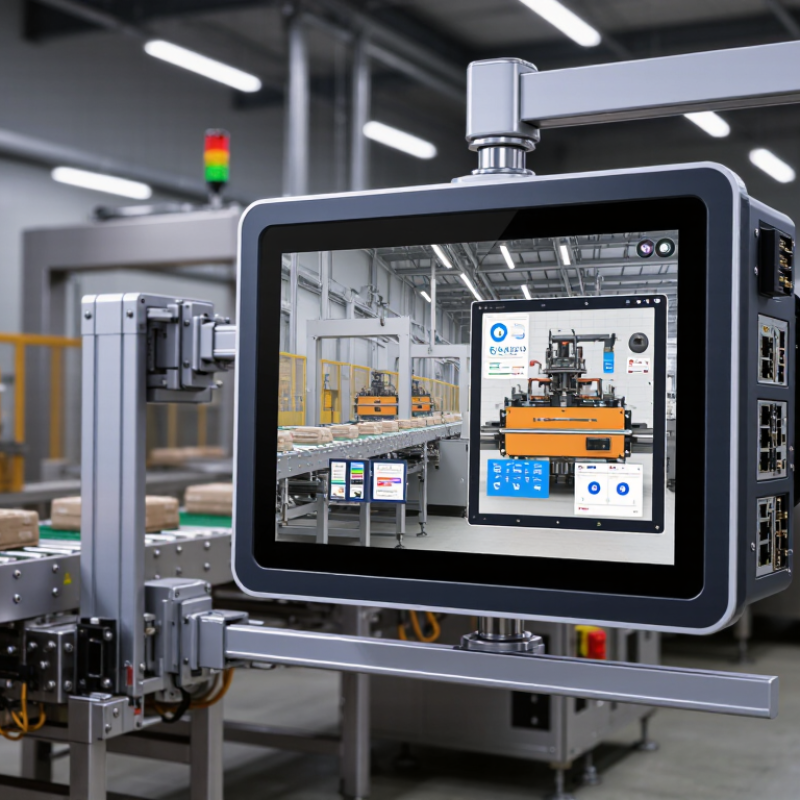
Industrial Panel Pc systems are rugged computers designed for demanding factory environments. They combine a display, processor, storage, and industrial interfaces in one sealed enclosure. Unlike office computers, they must tolerate vibration, dust, temperature changes, and continuous operation. The screen may show a machine dashboard, while the computer processes sensor data and sends commands through Ethernet, USB, serial, or fieldbus connections. In practice, an operator can stand beside a packaging line, touch an alarm message, and adjust production settings within seconds.

Market evidence shows why this technology remains relevant. Grand View Research estimates that the global industrial PC market will expand at a compound annual growth rate above 7% through 2030. MarketsandMarkets also identifies manufacturing, energy, and transportation as major application sectors. These reports reflect a broader shift toward connected equipment, edge computing, and real-time operational visibility. However, market forecasts are not guarantees. Actual value depends on installation conditions, software compatibility, cybersecurity controls, and maintenance quality.

A reliable Industrial Panel Pc should therefore be evaluated beyond screen size or processor speed. Engineers examine ingress protection, thermal design, mounting options, sunlight readability, and lifecycle support. A fanless unit may reduce dust intake, but passive cooling can limit performance under extreme heat. That trade-off matters. This guide explains the internal architecture, working process, and practical selection criteria behind these systems. It also questions a common assumption: a stronger computer is not always the better industrial solution.
What Is an Industrial Panel PC and How Does It Work?

Industrial Panel PCs Defined: Components, Functions, and 24/7 Operation

What Is an Industrial Panel PC and How Does It Work?

Industrial Panel PCs Defined: Components, Functions, and 24/7 Operation

An industrial panel PC combines a computer, display, and enclosure in one operator interface. Its processor runs control software, dashboards, and data collection tasks. The touchscreen usually supports gloves, wet fingers, and repeated inputs. Inside, solid-state storage, industrial memory, cooling systems, and protected connectors support demanding environments. A sealed metal or reinforced housing helps resist dust, vibration, and temperature changes. This is where the definition gets practical.

Industrial panel PCs connect with PLCs, sensors, cameras, drives, and factory networks. They translate machine signals into readable charts, alarms, recipes, and production records. IDC’s 2024 Worldwide Edge Spending Guide forecasts global edge-computing spending will reach 378 billion dollars by 2028. That growth increases demand for local processing near machines. Faster decisions matter when a delayed screen can interrupt a production line.

Nonstop operation requires more than a powerful processor. Engineers check thermal design, storage endurance, brightness, touch accuracy, and long-term component availability. MarketsandMarkets’ 2024 Industrial PC Market report projects continued market growth through 2029, driven partly by automation and connected production. In field commissioning, cable access and screen readability often matter more than impressive specifications. A perfect specification is rare. Maintenance still matters. Dust buildup, unstable power, and software faults can defeat rugged hardware. For reliable 24/7 use, teams need scheduled inspections, backup settings, surge protection, and tested restart procedures.

How Industrial Panel PCs Process Data Through CPU, RAM, Storage, and I/O

An industrial panel PC combines a computer, display, and control interface in one rugged enclosure. It processes machine data near the production area, where dust, vibration, and temperature changes are common. Its processor, or CPU, runs operating instructions and calculates responses from connected equipment. A faster CPU can handle several data streams, but speed alone does not guarantee reliable control.

RAM holds temporary data while applications are running. For example, it may store sensor readings, alarm states, and screen updates. More RAM helps when operators monitor multiple machines or use demanding visualization software. However, poorly designed software can still consume memory and cause slow responses. That delay matters. The storage drive keeps the operating system, programs, production records, and configuration files after power is removed. Solid-state storage usually handles vibration better than mechanical drives, although every drive needs suitable temperature and endurance ratings.

The I/O interface connects the panel PC with the physical process. Digital inputs can detect a switch position, while analog inputs measure values such as pressure or temperature. Outputs can activate relays, valves, or warning lights through properly rated control circuits. Communication ports may exchange data with controllers, scanners, and industrial networks. The CPU reads incoming signals, places working values in RAM, applies programmed logic, and sends commands through I/O. Storage records selected events for maintenance review. In practice, timing is not always perfect. Network traffic, software errors, or poor grounding can introduce unexpected delays, so engineers should test the complete data path under realistic operating conditions.

IEC 60529 IP65 Protection and -20°C to 60°C Industrial Operation

An industrial panel PC combines a display, computer, and touchscreen in one rugged enclosure. It collects data from machines, runs control software, and presents live readings to operators. Unlike office computers, it is designed for dust, vibration, electrical noise, and continuous operation. The IEC 60529 IP65 rating is especially important. The first 6 means the enclosure is dust-tight. The second 5 indicates protection against water jets from any direction. It does not mean the computer can survive immersion.

The stated operating range of -20°C to 60°C supports demanding factory environments, outdoor cabinets, and cold storage areas. However, temperature ratings need careful interpretation. Internal heat from the processor, sunlight, and sealed cabinet design can raise actual temperatures. At low temperatures, displays may respond slowly, and condensation can become a hidden risk. I have seen installations fail because moisture was ignored, even when the enclosure rating looked sufficient. That detail is easy to miss.

Tips: Mount the panel with a proper gasket and tighten fasteners evenly. Keep cable entries sealed. Avoid spraying cleaning fluid directly at connectors. Check airflow, cabinet temperature, and startup behavior during seasonal changes. A thermal test under real workload is more useful than relying only on a specification sheet. One imperfect assumption can become expensive. Also, IP65 protection may weaken after repeated maintenance, damaged seals, or incorrect replacement parts. Record inspections and test the touchscreen with gloves if operators wear them.

An industrial panel PC designed to IEC 60529 IP65 is completely protected against dust and protected against water jets from any direction. Its specified operating range of -20°C to 60°C supports reliable operation across a broad industrial temperature environment.

How Touchscreens, HMIs, PLCs, and Ethernet Protocols Work Together

An industrial panel PC combines a computer, display, and control interface in one rugged enclosure. It often operates near dust, vibration, heat, and electrical noise. The touchscreen presents an HMI, or human-machine interface. Operators can view temperatures, change settings, and acknowledge alarms with a gloved finger. Behind the screen, software processes data and sends commands to connected equipment.

The PLC handles real-time control tasks. It reads sensors, checks programmed conditions, and activates motors or valves. The panel PC usually does not replace the PLC. Instead, it displays PLC information and provides a clearer operating layer. Ethernet protocols connect these devices through structured data exchanges. Depending on the system, communication may carry status values, alarm codes, production counts, or control commands. A short network delay can matter. A wrong address can stop the conversation completely.

Tips: Keep critical safety logic inside the PLC, not only on the touchscreen. Use clear alarm messages and test them under realistic conditions. Separate control traffic from general office traffic when possible. Check cable shielding, connector quality, and network settings during commissioning. The neat diagram is useful, but reality is messier. A beautiful HMI can still confuse operators during a noisy, urgent event. Field experience shows that simple screens often work better. Still, every application needs review, because one interface cannot fit every process.

Selecting Panel PCs by Display Size, Performance, Interfaces, and MTBF

An industrial panel PC combines a display, computing hardware, storage, and a protective enclosure. It runs software while presenting controls directly on a machine or operator station. Touch input can replace a separate keyboard and mouse. In harsh areas, sealed fronts help resist dust, moisture, vibration, and accidental splashes. Real conditions matter.

Display size should match viewing distance and available panel space. A 7-inch screen suits compact equipment, while a 15-inch or larger display improves visibility for detailed diagrams. Brightness, viewing angle, touch response, and glove compatibility also affect daily use. A larger screen is not automatically better. It may create installation problems.

Performance depends on processor capability, memory, storage type, and operating temperature. Select enough capacity for the control software, dashboards, and future updates, but avoid paying for unused power. Interfaces deserve equal attention. Ethernet, serial ports, USB, digital I/O, and field communication options must match existing equipment. Adapters can work, but they add failure points. MTBF offers a useful reliability estimate, not a guaranteed service life. Review the test conditions, temperature range, and workload behind that figure. I have seen specifications look impressive until those details were checked. Leave room for cooling, cable bends, and maintenance access. Fit matters.

What Is an Industrial Panel PC and How Does It Work? - Selecting Panel PCs by Display Size, Performance, Interfaces, and MTBF

Selection Dimension Entry-Level Panel PC Standard Industrial Panel PC High-Performance Panel PC Selection Notes
Typical display size 7–10.1 inches 12.1–15.6 inches 17–24 inches Choose according to viewing distance, available panel space, and the amount of information shown simultaneously.
Common resolution 800 × 480 to 1280 × 800 1280 × 800 to 1920 × 1080 1920 × 1080 or higher Higher resolution improves data density, but may increase graphics, power, and software requirements.
Touch technology Projected capacitive or resistive Projected capacitive; optional resistive Projected capacitive, resistive, or non-touch Projected capacitive supports gestures; resistive touch is useful with gloves, tools, or wet conditions.
Processor class Low-power x86 or ARM, typically 2–4 cores Embedded x86, typically 4–8 cores Higher-tier x86, typically 6–16 cores Select based on operating system, HMI software, database load, analytics, and required response time.
Typical memory 4–8 GB RAM 8–16 GB RAM 16–64 GB RAM Memory should allow room for the operating system, HMI application, communication services, and future updates.
Storage 64–256 GB industrial-grade SSD or eMMC 128–512 GB industrial-grade SSD 256 GB–2 TB SSD; optional redundant storage Industrial SSDs are preferred where vibration, temperature variation, or continuous operation may affect consumer storage.
Ethernet connectivity 1 × Gigabit Ethernet 2 × Gigabit Ethernet 2–4 × Gigabit or multi-gigabit Ethernet Multiple ports can separate machine control, plant networks, cameras, and maintenance access.
Serial and industrial interfaces 1–2 × RS-232/422/485; optional GPIO 2–4 × RS-232/422/485; GPIO; optional CAN Multiple serial ports, CAN, GPIO, and optional fieldbus expansion Verify signal type, isolation, connector style, and protocol support for PLCs, drives, sensors, and controllers.
USB and display interfaces 2–4 × USB; HDMI or DisplayPort 4–6 × USB; HDMI, DisplayPort, or VGA 6 or more USB ports; multiple digital display outputs Check connector accessibility, locking options, cable clearance, and the number of external displays required.
Cooling method Fanless Fanless or controlled fan Controlled fan or hybrid cooling Fanless designs reduce dust entry and mechanical wear; active cooling supports higher sustained loads.
Typical operating temperature 0 to 50 °C -20 to 60 °C -20 to 60 °C; wider ranges available for specialized designs Actual limits depend on CPU load, storage type, installation orientation, airflow, and display brightness.
Ingress protection Front IP65 is common Front IP65 or IP66 is common Front IP65/IP66; full enclosure protection varies IP ratings apply only to the tested area and configuration; cable glands, covers, and installation affect protection.
Mounting options Panel mount, VESA, or desktop stand Panel mount, VESA, wall, or arm mount Panel, VESA, wall, arm, or rack integration Confirm cutout dimensions, mounting depth, weight capacity, and service access before installation.
Typical MTBF target Approximately 30,000–50,000 hours Approximately 50,000–70,000 hours Approximately 70,000–100,000 hours or more MTBF is a statistical reliability estimate, not a guaranteed service life. Compare test conditions and calculation methods.
Best-fit applications Basic machine HMI, kiosks, data entry, and equipment monitoring Production lines, SCADA terminals, warehouse systems, and process control Machine vision, dashboards, edge computing, analytics, and multi-display control rooms Match processing capacity and interfaces to the complete automation architecture rather than selecting by screen size alone.

Note: The specifications above represent realistic industry selection ranges for industrial panel PCs. Exact performance, environmental ratings, interface availability, and MTBF values vary by configuration and operating conditions.

Request a Quote

For more information on our instruments, consumables, or services, or to request a quote, complete the contact form below, and one of our associates will reach out to you!

Request a Service Quote

To request service on your machine(s), complete the contact form below, and one of our associates will reach out to you!

Browse by:

  • Test Property
  • Manufacturer